How to check whether a backlink page is indexed
A backlink review has more than one question: does the publisher's page exist, does it still contain your link, is the page eligible for search, and what evidence is available about Google's index? One observation does not answer all four.
Do not turn an absent search result into a precise claim that a link passes zero value. Google does not provide a public per-link equity meter, and third-party authority scores are not Google's own measurements.
1. Open the actual publisher URL
Use the page containing your link, not only the publisher's homepage or your destination URL. Check the final address after redirects, whether the page is accessible without signing in, and whether your link still points to the intended destination.
Keep a short review record: publisher URL, destination URL, date checked, observed link and any issue you can reproduce. This helps you distinguish a removed link from an indexing question.
For a guest post, inspect the article carrying the backlink. For a local citation, inspect the actual business listing. A publisher's homepage appearing in search does not establish the state of either page. The guide to discovery, crawling and indexing explains why the source page and your destination need separate checks.
2. Treat search operators as a limited observation
You can try a query such as site:example.com/relevant-page, but absence is not a complete index audit. Google's site operator documentation explains that the results are not exhaustive. Avoid using the result count to calculate an indexing percentage for a whole backlink list.
If a relevant result appears, check which URL it represents. A redirect or alternate version may explain why it differs from the URL in your spreadsheet.
3. Use the right Search Console report
For a property you control, URL Inspection is the more direct place to examine Google's recorded information for a particular URL. You normally need the publisher's help for a property you do not control.
The Search Console Links report describes links Google reports for your property. Its samples are not a complete real-time list of all links, and it does not certify that every publisher URL in a backlink campaign is indexed now.
When the publisher can help, ask for the exact inspected URL, inspection date, reported coverage state and Google-selected canonical when available. Distinguish the stored index result from a live test. Google's URL Inspection reference explains the difference; a successful live fetch alone does not confirm index inclusion.
4. Keep third-party indexes separate
A backlink tool may show a URL as live, lost or known to its own crawler. Record the tool and check date rather than relabeling that observation as a Google index confirmation. Tools can discover different portions of the web at different times.
| Evidence | What it supports |
|---|---|
| Publisher page opens and contains your link | The link is currently visible in that view. |
| A search operator returns no result | That query returned no result; it is not an exhaustive negative finding. |
| Publisher provides a dated inspection | A specific search-engine observation for that URL and time. |
| Third-party crawler finds the link | The crawler's observation, not Google's complete internal treatment. |
Work through a backlink-checking example
Suppose a guest article at https://example.com/guest-guide links to your product page. This is an illustrative example, not a customer result. The article opens, the backlink is visible, but your search operator returns nothing. Record those observations; do not mark the link as removed or calculate lost ranking value from that search alone.
If the publisher supplies an inspection showing the same URL indexed, keep that dated evidence. If Google selected a different canonical, ask whether the backlink appears on that version as well. If the publisher reports a technical exclusion, ask them to review the source page before adding it to another paid batch.
Review a large backlink list without mixing outcomes
- Keep one row per source page and record its final address after redirects.
- Use separate columns for link present, publisher access, Google evidence and third-party crawler evidence.
- Separate pages needing a publisher fix from pages with no confirmed problem.
- Keep submission date and processing status in their own columns, rather than replacing the indexing evidence.
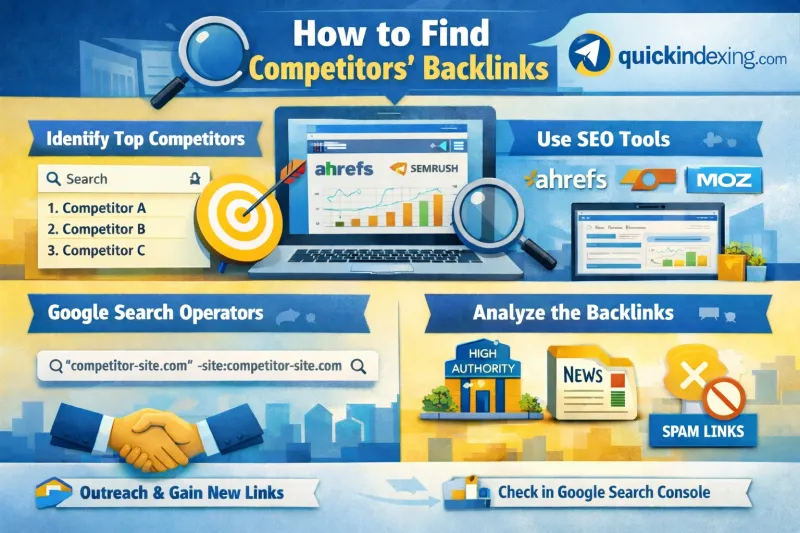
When research identifies a useful publisher, the competitor backlink research workflow helps assess relevance before pursuing similar placements. A high domain score alone is not a reason to buy a link or a submission.
Choose the next action
Ask the publisher to repair a removed or broken link. Investigate a demonstrated access or canonical problem before paying for submissions. If the publisher reports a Search Console exclusion, use the relevant crawled-page or discovered-page guide.
QuickIndexing's bulk backlink submission checklist helps organize an eligible list after review. A Submitted record is not an independent Google indexing check. Read the submission methodology before treating operational status as an SEO outcome.
Backlink indexing questions
Can I inspect a publisher's URL in my own Search Console property?
Your verified destination property does not give you URL Inspection access to another publisher's property. Ask the publisher for a dated result when you need that evidence.
Does nofollow or ugc prove that the source page is not indexed?
No. Link attributes and the source page's index status are different checks. Record the attribute separately. Google's outbound-link guidance explains how those attributes describe a link's relationship.
Should I submit every URL missing from a backlink tool?
No. First determine whether the page and backlink exist and which dataset is missing the URL. A third-party crawler's omission is not a Google indexing verdict, and another submission cannot repair a removed link.
By QuickIndexing. Reviewed 27 October 2026.